Unitree R3 Controller – Wireless Remote For Go2, Go2-W, B2 Robot Dogs & G1, H1 Humanoids (R3CONTR)
In stock
- BRAND:
- UNITREE ROBOTICS
- MODEL:
- R3
- PART #:
- R3CONTR
- ORIGIN:
- China
- AVAILABILITY:
- SUBJECT TO AVAILABILITY
- SKU:
- Unitree-R3CONTR
Unitree R3 Controller – Wireless Remote For Go2, Go2-W, B2 Robot Dogs & G1, H1 Humanoids (R3CONTR)
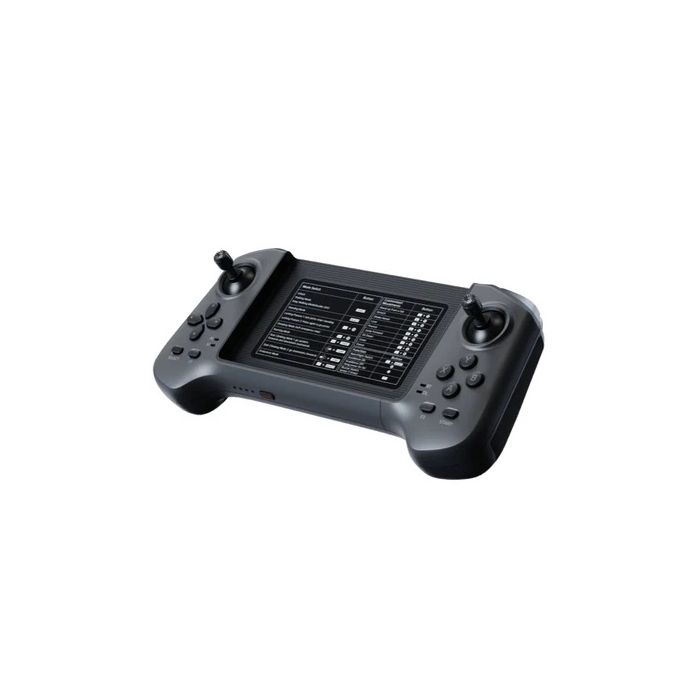
Most of the time a legged robot spends in front of people is spent at the end of somebody's thumbs. The gait, the sensors and the onboard computer decide what the machine can do. The handheld remote decides how quickly, and how confidently, an operator can ask for it. The Unitree R3 Controller – Wireless Remote For Go2, Go2-W, B2 Robot Dogs & G1, H1 Humanoids (R3CONTR) is Unitree's answer to that quieter half of the problem. It is a compact, lightweight remote with two joysticks, twelve buttons and four shoulder buttons, and it is designed to be the one controller an operator picks up, whichever Unitree robot is on the floor that day.
Robots Europa, based in Dublin, supplies the R3 Controller to universities, research institutes, system integrators and companies throughout the European Union and the DACH region. Robots Europa prepares your quotation, arranges delivery to your site and remains your point of contact for support once the controller has been paired with your robots.
Background
Unitree Robotics and the handheld interface
Unitree Robotics is one of the most visible manufacturers of quadruped robots. In recent years it has extended its range to humanoid platforms as well. Its robot dogs and humanoids appear in research laboratories, teaching environments, inspection trials and public demonstrations. In each of these settings, direct manual control remains essential alongside autonomous and app-based operation. The handheld remote is the tool an operator uses to walk a robot out of its transport case and position it for a test. It is also the tool that lets the operator take over at once when something unexpected happens. A controller that feels natural in the hand therefore shapes the whole working session, even though it rarely features in the robot's headline specifications.
One remote for the whole range
Unitree presents the R3 as newly upgraded, with immersive interaction as its central theme. Its defining idea is breadth of compatibility. The R3 Controller is compatible with the entire Unitree product line, including G1, H1, Go2, B2 and more. The user guide carries separate button descriptions for G1, H1, Go2, Go2-W and B2. An operator therefore keeps one grip and one physical layout and consults the relevant button description for the robot in front of them, rather than learning a new handset for each platform. Flexible combination keys extend what the physical buttons can trigger. A built-in vibration motor and buzzer return optional vibration or sound feedback to the operator, which gives the controls a realistic, tactile feel.
Technical Specifications
| Specification | Value |
|---|---|
| Version | R3 |
| Size | 216.43×100×41.42mm |
| Weight | 300g |
| Controls | 2 joysticks + 12 buttons + 4 shoulder buttons, with flexible combination keys |
| Communication method | Wireless Data Transmission, Bluetooth |
| Control distance | Above 100m |
| Lithium battery capacity | 780mAh |
| Battery life | 5h |
| Charging voltage | 5.0V |
| Charging current | 700mA |
| Feedback | Built-in vibration motor and buzzer, optional vibration or sound feedback |
| Phone mount | Yes, paired with the Unitree official app |
| Compatibility | Unitree product line, including G1, H1, Go2, B2; user guide button descriptions for G1, H1, Go2, Go2-W, B2 |
Specifications are as published by the manufacturer and are confirmed against the datasheet at quotation.
Unitree has not published the operating temperature, the IP rating, the package contents, the charging port type, any display specifications or the Bluetooth version; Robots Europa confirms these details with your quotation.
What makes the Unitree R3 Controller different from a single-robot remote?
A remote supplied with one robot is shaped around that robot alone. The R3 Controller takes the opposite approach. Unitree designed it for the whole product line and documents its button assignments for G1, H1, Go2, Go2-W and B2 in a single user guide. For an organisation running more than one Unitree platform, the practical gain is consistency. The same handle sits in the palm, the same joysticks steer, and the shoulder buttons sit in the same place, whether the operator is walking a quadruped down a corridor or guiding a humanoid across a stage.
The second difference is the way the controller communicates with its user. The phone mount holds a smartphone running the Unitree official app, so status information and app functions sit directly above the physical controls. The built-in vibration motor and buzzer add feedback that can be felt or heard, and either form can be switched on as preferred. Communication runs over wireless data transmission and Bluetooth, with a control distance above 100m. The streamlined handle is shaped to fit the palm for a comfortable grip during longer sessions.
How long does the R3 Controller run, and how is it charged?
The R3 Controller carries a lithium battery with a capacity of 780mAh and offers a battery life of 5h. It charges at a charging voltage of 5.0V and a charging current of 700mA. Teams planning long trial days or exhibition shifts can schedule recharging between sessions around these figures, and organisations running several robots can keep a second controller charged so that an operator is always ready.
Who is the Unitree R3 Controller for?
The R3 Controller is aimed first at organisations that operate, or intend to operate, several Unitree platforms. Research groups that keep a quadruped and a humanoid in the same laboratory benefit from one shared controller logic. Technical staff can then train students and new colleagues once, rather than once per robot. System integrators who build applications on Go2, B2 or the wheeled platforms in the Go2-W range gain a consistent manual-control tool for commissioning and testing at customer sites.
Universities and technical colleges will appreciate a remote that lets every student in a cohort learn one layout. Demonstration and events teams, who often hand the controller from one presenter to the next, benefit from the comfortable grip and the optional tactile feedback. The R3 also serves as a spare or replacement handset for fleets in which an additional remote keeps a second operator ready.
Buyers who run a single platform and wish to compare options can also consider the Unitree Go2 Remote Controller, Optional For Go2 Air And Go2 Pro (GO2-CONTR) or the Unitree G1 Two-Handed Remote Controller (G1-RCONTROLLER). Robots Europa will help you decide which controller fits your fleet. Further add-ons are listed in the Accessories category.
What is the Unitree R3 Controller used for?
- Mixed-fleet operation – one handset and one layout for quadrupeds and humanoids across the Unitree range.
- Research and testing – direct manual control for positioning robots before experiments and taking over during trials.
- Teaching and training – a single controller logic that students and new staff learn once.
- Demonstrations and exhibitions – comfortable, feedback-rich control for presenters working in front of an audience.
- Integration and commissioning – a dependable manual tool for integrators bringing robots into service at customer sites.
- App-assisted operation – a mounted smartphone running the Unitree official app alongside the physical controls.
Pricing and Availability
Robots Europa supplies the Unitree R3 Controller on a quotation basis, so that the offer reflects your robots, your quantity and your delivery location. Please tell us which Unitree platforms you operate. We will then match the controller to your fleet and suggest any accessories you may need. Delivery, customs and support are arranged with your quotation. A personalised quotation for the Unitree R3 Controller is available on this page.
Frequently Asked Questions
Which robots does the R3 Controller work with?
The R3 Controller is compatible with the entire Unitree product line, including G1, H1, Go2, B2 and more. The user guide provides button descriptions for G1, H1, Go2, Go2-W and B2.
How does the controller connect to the robot?
The controller communicates by wireless data transmission and Bluetooth. Its control distance is above 100m.
How large and heavy is the controller?
The R3 Controller measures 216.43×100×41.42mm and weighs 300g. Its streamlined handle is shaped to fit the palm for a comfortable grip.
How long does the battery last?
The battery life is 5h from a lithium battery capacity of 780mAh. It charges at 5.0V and 700mA.
Can I use my smartphone with it?
Yes. The R3 has a phone mount and works with the Unitree official app for easier, precise operation.
What feedback does the controller give?
A built-in vibration motor and buzzer offer optional vibration or sound feedback. The operator can feel or hear the response of the controls, which gives a realistic control feel.
Where can I buy the Unitree R3 Controller and what does it cost?
You can buy the Unitree R3 Controller from Robots Europa, which supplies customers throughout the EU and the DACH region. The cost depends on quantity, delivery location and any accessories, so Robots Europa provides it in a personalised quotation.
Summary
A robot is only as accessible as the controller in its operator's hands, and the Unitree R3 Controller is built around that fact. It offers two joysticks, twelve buttons and four shoulder buttons with flexible combination keys. A streamlined handle, a phone mount for the Unitree official app and optional vibration or sound feedback complete the design. It is compatible across the Unitree product line, with button assignments documented for G1, H1, Go2, Go2-W and B2. For organisations that want one familiar remote across quadrupeds and humanoids, backed by Robots Europa for quotation, delivery and support, this page is the starting point.