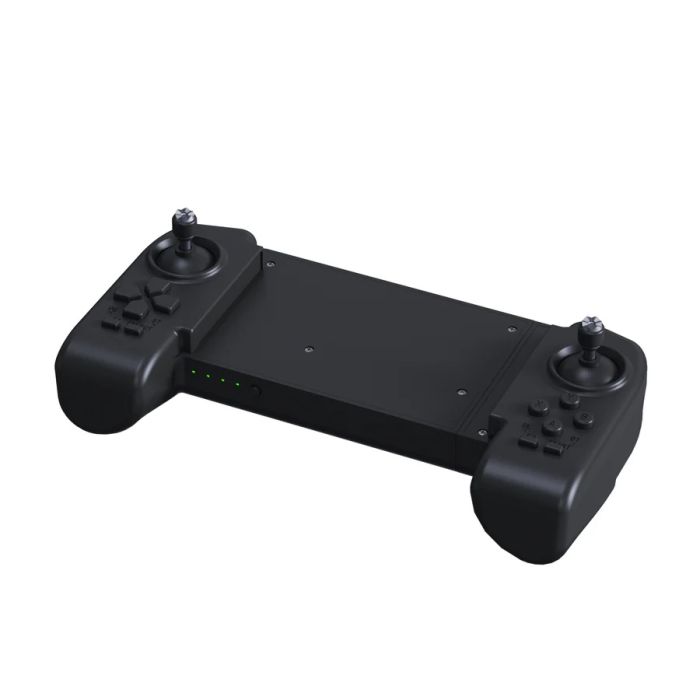
Unitree Go2 Remote Controller, Optional For Go2 Air And Go2 Pro (GO2-CONTR)
In stock
- BRAND:
- UNITREE ROBOTICS
- PART #:
- GO2-CONTR
- ORIGIN:
- China
- AVAILABILITY:
- SUBJECT TO AVAILABILITY
- SKU:
- Unitree-GO2-CONTR
Unitree Go2 Remote Controller, Optional For Go2 Air And Go2 Pro (GO2-CONTR)
A touchscreen is a fine place to plan a walk, but a poor place to steer one. When a quadruped is trotting across a workshop floor or picking its way along a corridor, the operator's eyes belong on the robot, and the hands need controls they can find without looking down. The Unitree Go2 Remote Controller, Optional For Go2 Air And Go2 Pro (GO2-CONTR) is built for exactly that moment: a bimanual handset, held in both hands, with its own data transmission module and Bluetooth module inside, so that the Go2 robot dog can be commanded through a dedicated physical device rather than a pane of glass.
Robots Europa, based in Dublin, supplies the GO2-CONTR to customers throughout the European Union and the DACH region. Robots Europa prepares the quotation, arranges delivery to your site and provides support after the handset arrives, whether it is ordered on its own for an existing Go2 or alongside a new robot.
Background
Unitree Robotics and the Go2 family
Unitree Robotics is a Chinese manufacturer whose name has become closely associated with legged robots, from compact quadrupeds for teaching and research to larger platforms intended for industrial work, as well as humanoid systems. The Go2 is its compact quadruped, offered in several versions: the Go2 Air, the Go2 Pro and the Go2 EDU. The versions share the same basic body but differ in the equipment supplied with them, and the remote controller is one of the clearest examples of that difference: the Go2 EDU is delivered with it as its standard remote controller, whereas for the Go2 Air and the Go2 Pro it is an optional addition.
That distinction matters when a robot is being specified. A team buying a Go2 Air or a Go2 Pro decides for itself whether a dedicated handset belongs in the package, and the GO2-CONTR is the item that fills that gap.
A dedicated link between hands and legs
The handset is part of the Go2 remote control module. Two communication components are built in: a data transmission module and a Bluetooth module. The communication between the robot dog and the bimanual remote control can be carried out by the data transmission module, which operates at 2.4 GHz. The communication mode is digital transmission module and Bluetooth, and the remote control distance is more than 100 m.
In general terms, a dedicated radio handset gives the operator a control path that does not depend on a phone or tablet being paired and in hand. For demonstrations, teaching sessions and site trials, that independence is often what makes a legged robot practical to operate with confidence, because the person in charge can keep attention on the robot and its surroundings.
Technical Specifications
| Specification | Value |
|---|---|
| Built-in communication modules | Data transmission module, Bluetooth module |
| Communication mode | Digital transmission module, Bluetooth |
| Robot link | Communication between the robot dog and the remote control via the data transmission module |
| Frequency | 2.4 GHz |
| Remote control distance | More than 100 m |
| Operating time | Approx. 4.5 hours |
| Charging voltage | 5V |
| Charging current | 2A |
| Unitree Go2 EDU | Standard remote controller |
| Unitree Go2 Air | Optional |
| Unitree Go2 Pro | Optional |
Specifications are as published by the manufacturer and are confirmed against the datasheet at quotation. The manufacturer has not published the dimensions, the weight, the IP rating, the operating temperature range, the charging time or the type of charging port; these details are confirmed at quotation.
Does a Go2 Air or Go2 Pro need the remote controller?
Neither version requires it, which is precisely why the question is worth asking before an order is placed. For the Go2 Air and the Go2 Pro, the handset is optional, so the robot can be purchased without it. The decision therefore rests on how the robot will be used day to day.
Where the Go2 is operated by one person in a controlled room for short sessions, the case for a separate handset may be modest. Where it is taken outdoors, handed between several operators, shown to visitors or walked along a route that requires sustained attention, a dedicated bimanual controller with its own data transmission link changes the experience considerably. The operator holds a device designed for the task, the link to the robot runs over the built-in data transmission module at 2.4 GHz, and the control distance of more than 100 m leaves room to step back from the robot while still commanding it.
Battery life is the other practical consideration. With an operating time of approx. 4.5 hours, the handset covers a working morning or an extended demonstration. Charging is at 5V and 2A, so the handset can be planned into the same charging routine as the robot's own batteries.
How does the Go2 Remote Controller communicate with the robot?
The handset carries two communication paths. The data transmission module is the one that carries the link between the robot dog and the remote control, and it operates on the 2.4 GHz band. The Bluetooth module is the second built-in path, giving the handset a further means of communication alongside the data transmission module.
For organisations in the EU and the DACH region, the 2.4 GHz band is the one commonly used for short-range radio equipment such as remote controls, which keeps the handset in familiar territory for facility managers and safety officers who review the radio devices brought on site.
Who is the Unitree Go2 Remote Controller for?
The first and clearest group is owners and buyers of the Go2 Air. Because the handset is optional for this version, anyone who has bought or is specifying an Air and wants a dedicated physical controller is the natural customer for the GO2-CONTR.
The second group is owners and buyers of the Go2 Pro. Here too the controller is optional, and it suits teams that take the Pro out of the laboratory: to trade fairs, open days, university grounds and pilot sites where operating the robot from a phone is less convenient.
Buyers of the Go2 EDU are in a different position. The remote controller is standard equipment for the EDU, so an EDU customer already receives a handset with the robot and should check the delivery contents before ordering this item separately.
Beyond the individual versions, the handset suits teaching staff who supervise students working with the robot, integrators who need to drive a Go2 into position during testing, and communications teams that present the robot to audiences and want a dependable way to keep it under control throughout.
What is the Unitree Go2 Remote Controller used for?
- Live demonstrations — steering the Go2 in front of an audience while keeping eyes on the robot rather than a screen.
- Teaching and supervision — giving instructors a dedicated handset for moving the robot between exercises in a lab or classroom.
- Site walk-throughs — walking the robot along a route during a pilot or feasibility visit, with room to stand back from it.
- Positioning during integration — driving the robot into place while engineers test sensors, payload mounts or software.
- Trade fairs and open days — operating a Go2 Air or Go2 Pro for extended sessions across a busy event day.
- Shared fleets — passing a single, familiar control device between several operators within one team.
Pricing and Availability
Robots Europa quotes the GO2-CONTR individually, either as a stand-alone accessory for a Go2 you already operate or as part of a package with a new Go2 Air or Go2 Pro. Tell us which version you run, where the handset will be used and how many operators will share it, and the quotation will reflect that configuration. Delivery, customs and support are arranged together with the quotation, so that the handset arrives with nothing left to settle afterwards. To begin, the quotation request for the Unitree Go2 Remote Controller is available on this page.
Frequently Asked Questions
Which Go2 versions is the remote controller intended for?
The handset is optional for the Go2 Air and the Go2 Pro. The Go2 EDU is supplied with it as its standard remote controller.
Do I need to order it separately with a Go2 EDU?
Normally not, because the remote controller is standard for the Go2 EDU. Please check the delivery contents of your EDU before ordering an additional unit.
On which frequency does the controller operate?
The controller operates at 2.4 GHz. Its communication mode is digital transmission module and Bluetooth.
How far from the robot can I operate it?
The remote control distance is more than 100 m. That leaves ample room to stand well back from the robot during a demonstration or a site walk-through.
How long does the controller run, and how is it charged?
The operating time is approx. 4.5 hours. Charging is at 5V and 2A.
Which communication modules are built into the handset?
The handset has a built-in data transmission module and a built-in Bluetooth module. The communication between the robot dog and the remote control can be carried out by the data transmission module.
Where can I buy the Unitree Go2 Remote Controller and what does it cost?
You can buy it from Robots Europa, which supplies customers across the EU and the DACH region from Dublin. The cost depends on your configuration and is set out in an individual quotation, which you can request on this page.
Summary
A legged robot is only as composed as the person guiding it, and that person works best with controls in hand and eyes on the robot. The Unitree Go2 Remote Controller provides that: a bimanual handset with a built-in data transmission module and Bluetooth module, a 2.4 GHz link to the robot dog, a remote control distance of more than 100 m and an operating time of approx. 4.5 hours. It is standard with the Go2 EDU and optional for the Go2 Air and the Go2 Pro, which makes it the deciding accessory for Air and Pro owners who want to move away from screen-based control. For a quotation from Robots Europa, with delivery and support arranged throughout the EU and the DACH region, this page is the starting point.
Specifications
General
What's included
Related Products
Out of stock